Regions
A region is a closed shape that limits where an operation may cut. The operation’s targets still say what to machine; the region says where. A region is never material, never a cut on its own, and never turned into a toolpath along its edge.
Main idea
Section titled “Main idea”- Create a region with the Create regions target in the tool rail, or change a closed feature’s Operation to Region mask. Regions must be closed. They are listed in the Regions section of the feature tree and named Region with a number.
- Set its mode with Mask mode in its properties: Include (the default) or Exclude. The tree row shows an include or exclude badge.
- Apply it by selecting it together with the targets when you add an operation, or by right-clicking it and choosing Add to operation. An operation ignores regions it was not given. The operation’s target then lists the regions as filters.
A region’s Z range always follows the stock (Follows stock): it filters in XY through the whole thickness.
Include and exclude
Section titled “Include and exclude”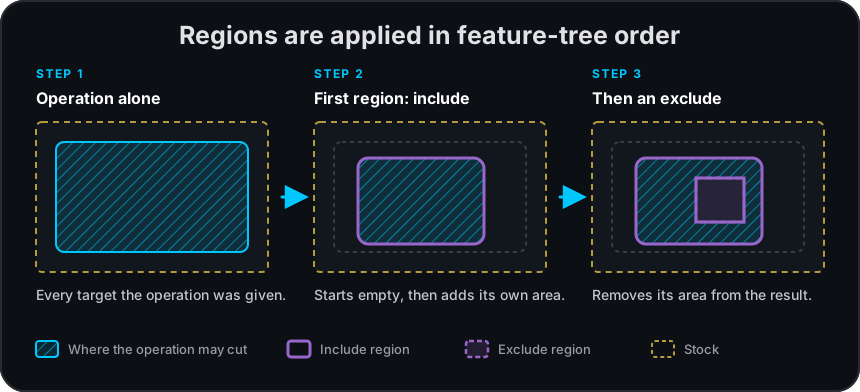
- An include region allows cutting inside it.
- An exclude region forbids cutting inside it.
When an operation has several regions, they are applied in feature-tree order:
- If the first region is an include, the allowed area starts empty and the region is added to it.
- If the first region is an exclude, the allowed area starts as everything the operation would cut, and the region is removed from it.
- Each later include adds its area back; each later exclude removes its area again.
Several include regions together allow their combined area. With a mix of include and exclude regions, the order decides the result, so keep the tree order readable and check the toolpath after you reorder regions.
Tool-centre boundary
Section titled “Tool-centre boundary”The two modes treat the region’s edge differently:
- Include means everything inside must be cut. To reach material right at the edge, such as a sharp corner, the cutter may reach past the region’s boundary.
- Exclude means the cutter stays out. The whole cutter, not just its centre, is kept outside the region, with the operation’s clearance.
Either way, a region can only reduce what an operation cuts. It never adds a cut that the operation would not make without it. Entry moves, such as helices, and links between cuts also stay inside the allowed area.
For V-carving, the groove gets narrower as it gets shallower, so with an include region the shallower passes can reach slightly beyond the boundary. They never cut beyond what the operation would cut without the region.
Where masks apply
Section titled “Where masks apply”| Operations | How the region is applied |
|---|---|
| Pocket, surface clean, V-carve offset, V-carve medial, and the 3D surface operations | Limits the area that is cleared or finished. |
| Edge route inside and outside, and engrave | Limits which parts of the path are cut. Edge routes honour regions only with the Contour strategy. |
| Drill | Limits which holes are drilled. |
While a region is applied, some options are replaced:
- XY approach & exit is not used. The operation reports XY approach and exit are unavailable while a region mask is applied to this operation, so the ordinary entry and retract were used.
- Check the operation’s warnings after adding a region, and look at the toolpath: a masked result is not simply the unmasked toolpath with parts removed.
Related pages
Section titled “Related pages”- Features, roles, and depth: the region mask role among the other roles.
- Working with operations: adding targets and regions to an operation.
- Clamps and clearances: keeping the cutter away from workholding.
- 3D surface finish slope filter: combining regions with the slope filter.