Clearing patterns
How it works
Section titled “How it works”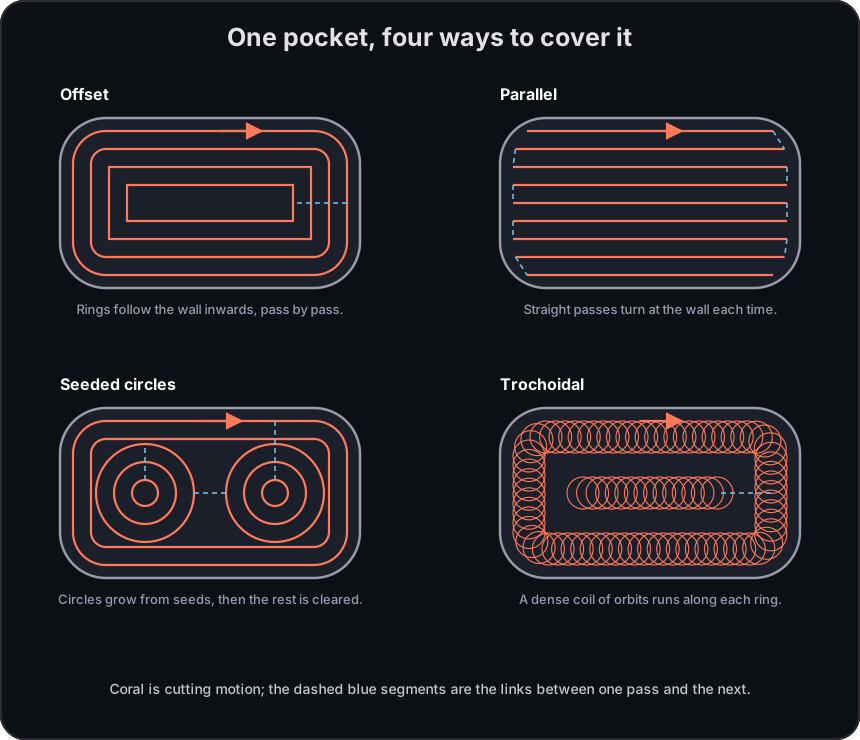
Offset follows successive inset contours. Parallel sweeps straight raster passes at the selected angle. For circular seeds, see Seeded-circle clearing. For load-managed orbiting paths, see Trochoidal cutting. Choose the pattern based on the desired finish, path shape, and the feature geometry.
Where it applies
Section titled “Where it applies”| Operation | Where to find it |
|---|---|
| Strategy > Pattern | |
| Surface clean | Strategy > Pattern |
| 3D surface rough | Strategy > Pattern |
| 3D surface cleanup | Strategy > Pattern (floor cleanup) |
Settings
Section titled “Settings”| Setting | Description |
|---|---|
| Pattern | Selects the clearing pattern. This page explains Offset and Parallel; Seeded circles and Trochoidal have dedicated guidance. |
| Angle | Sets the direction of Parallel passes. |
| Stepover Ratio | Sets the lateral gap between applicable passes as a fraction of the tool diameter. |
Offset paths simplify compatible polylines into arcs and circles, which can make the generated G-code smaller and motion smoother.
Overlapping subtracts
Section titled “Overlapping subtracts”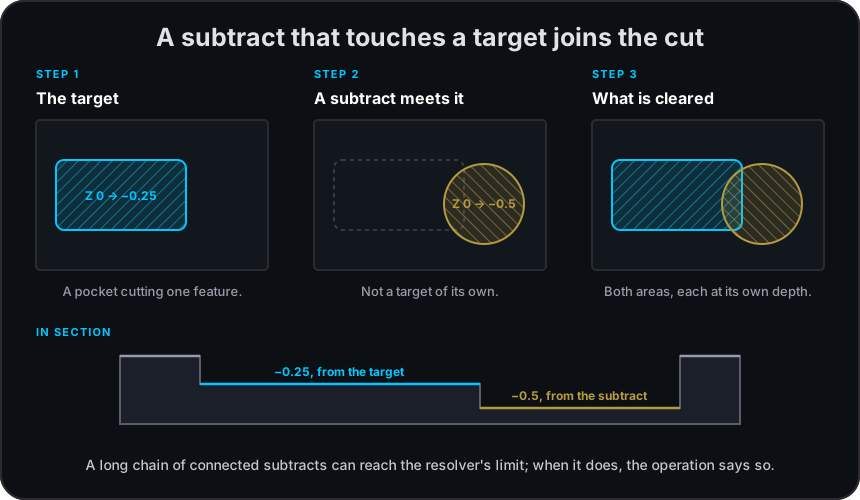
Non-target subtract features that meet a target can extend the resolved cut region at their own depth. Long connected chains can reach the resolver’s chain limit and report a warning. Inspect the resolved bands and warnings when nearby pockets overlap; split the geometry or targets if the result is not the region you intended to clear.
Limitations
Section titled “Limitations”Related pages
Section titled “Related pages”- Trochoidal cutting: a load-managed alternative for supported roughing operations.
- Seeded-circle clearing: clear from fitted circular regions before offset rings finish the area.
- Linking clearing passes: shape compatible transitions between Offset or Seeded-circle rings.
- Corners: rounding and relief controls for compatible contour paths.