Corner rounding and relief
How it works
Section titled “How it works”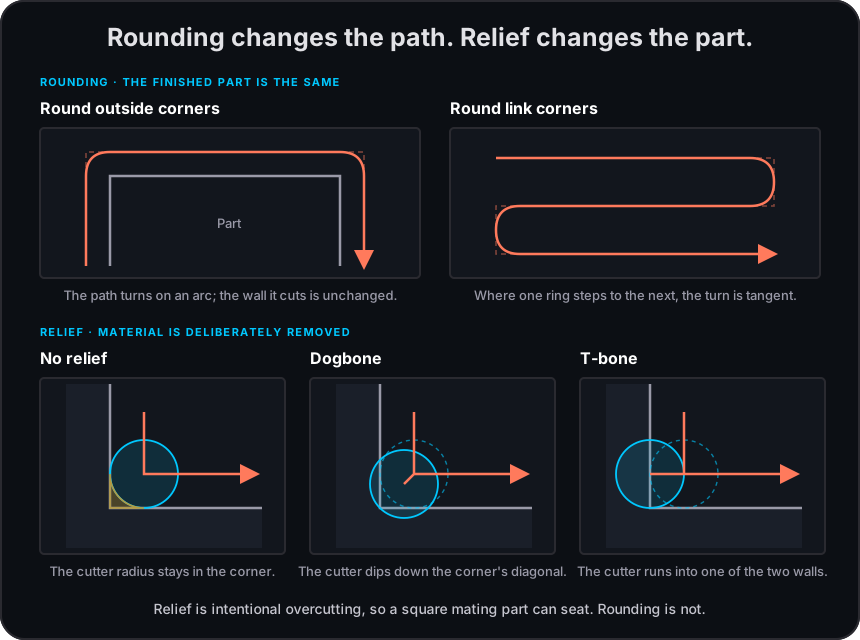
The Corners group can round outside contour corners and clean reachable wall corners. Corner relief deliberately removes extra material at inside corners so a square mating part can seat. For the separate ring-to-ring transition control, see Linking clearing passes.
Where it applies
Section titled “Where it applies”| Operation | Where to find it |
|---|---|
| Corners on supported non-trochoidal patterns | |
| Surface clean | Corners where its clearing controls apply |
| 3D surface rough | Corners where its clearing controls apply |
| Inside edge route | Corners |
| Outside edge route | Corners |
Settings
Section titled “Settings”| Setting | Description |
|---|---|
| Round outside corners | Rounds eligible external contour corners. |
| Clean wall corners | Removes reachable material left by rounded rings. |
| Corner relief | Selects None, Dogbone, T-bone, or T-bone longest edge. |
Corner relief
Section titled “Corner relief”Dogbone relief opens the corner with a smaller circular extension. T-bone options remove more material and select a wall direction; T-bone longest edge chooses the longer adjacent edge. The generator skips corners it cannot cut safely and reports a warning.
Limitations
Section titled “Limitations”Related pages
Section titled “Related pages”- Clearing patterns: choose the compatible contour pattern first.
- Linking clearing passes: use tangent transitions between compatible rings.
- Trochoidal cutting: why trochoidal pockets cannot use corner relief.